HTTP Router: On-Call Survival Guide
This guide helps EOC (engineer-on-call) respond to incidents related to HTTP Router.
What is HTTP Router
Section titled “What is HTTP Router”HTTP Router is the entry point for all HTTP requests under gitlab.com/*. It sits between Cloudflare’s edge network and GitLab’s backend infrastructure, determining which Cell should handle each incoming request. Currently, by default it proxies requests to our legacy cell.
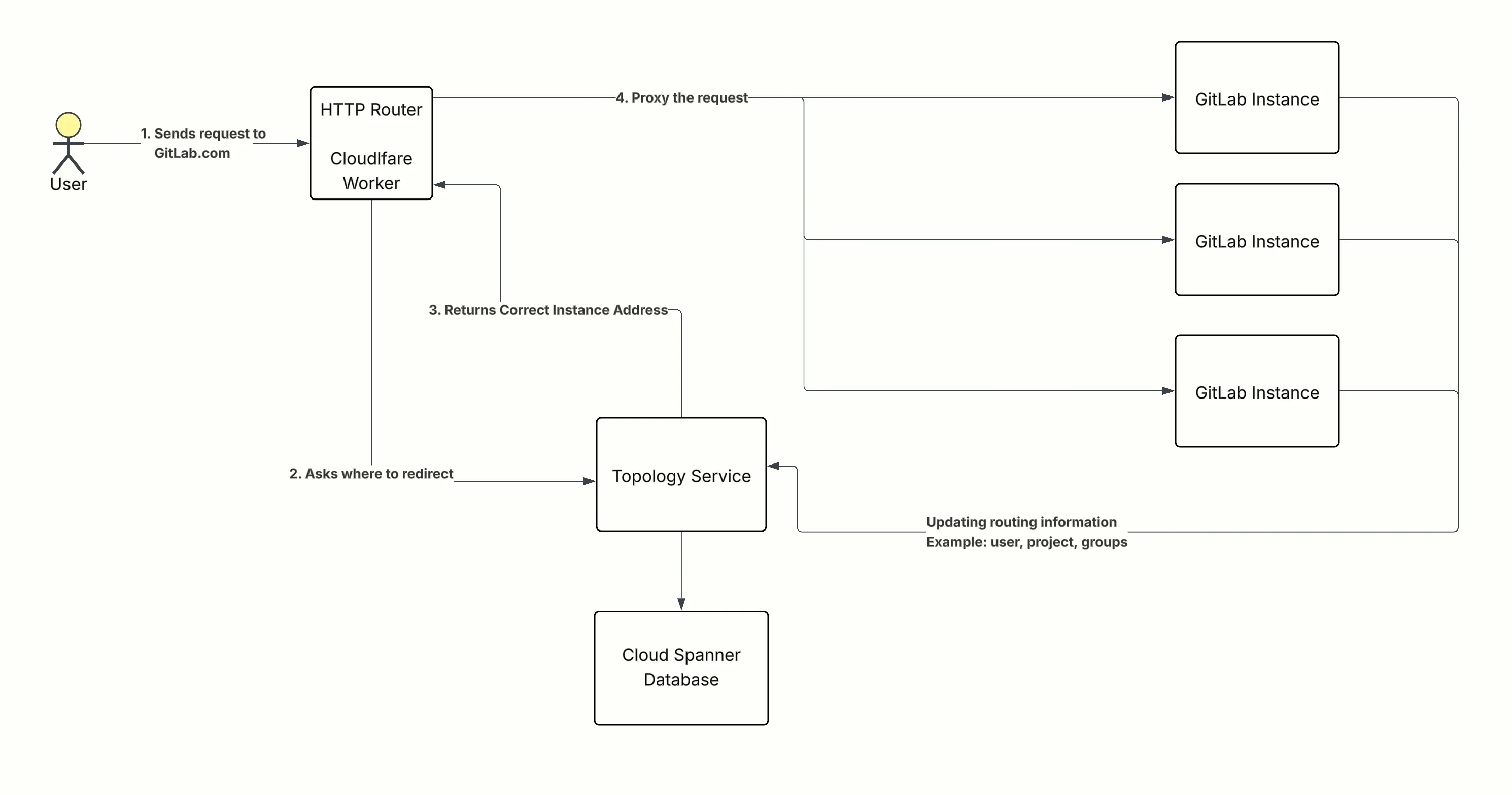
HTTP Router is built on Cloudflare Workers and deployed via http-router-deployer. It enables the Cells architecture by presenting all Cells under a single gitlab.com domain.
Design Documentation: HTTP Routing Service Architecture
What HTTP Router Does
Section titled “What HTTP Router Does”- Routes requests to the correct Cell based on path, headers, or cached classification.
- Currently, it proxies most requests to our legacy cell. This will change once path-based routing is enabled.
- Queries Topology Service to identify which cell to proxy requests to (classify).
What HTTP Router Does NOT Do
Section titled “What HTTP Router Does NOT Do”- Does not buffer request bodies (memory-constrained)
- Does not handle Git SSH traffic (separate SSH routing)
- Does not perform authentication or authorization (it may extract routing keys from tokens, but validation happens in the backend GitLab application)
- Does not make routing classification decisions itself (core classification logic lives in Topology Service)
How HTTP Router Communicates with Topology Service
Section titled “How HTTP Router Communicates with Topology Service”HTTP Router authenticates to Topology Service using Cloudflare Zero Trust Service Tokens. These tokens are:
- Injected via Worker environment variables
- Automatically rotated using a dual-token strategy (Token A rotates 90 days before expiry, Token B rotates 180 days before expiry) to ensure zero downtime
- Managed through config-mgmt
If there is an issue with service token authentication, you will see high error rates from the Classify service as a symptom. In this case:
- Check Sentry for authentication-related exceptions
- Check Topology Service metrics for incoming request failures
- Review Cloudflare Access Audit Logs for blocked requests
For more details, see security.md.
Critical Information
Section titled “Critical Information”| Metric | Value |
|---|---|
| Traffic Volume | ~40k+ requests/second |
| Deployment | Cloudflare Workers (edge) |
| Dependencies | Topology Service, Worker Environment Variables |
Quick Links
Section titled “Quick Links”| Resource | Link |
|---|---|
| Repository | gitlab-org/cells/http-router |
| Deployer | http-router-deployer |
| Pipelines | Deployment Pipelines |
| Grafana | HTTP Router Overview |
| Sentry | http-router |
| Alerts | HTTP Router Alerts |
Escalation
Section titled “Escalation”Troubleshooting Steps
Section titled “Troubleshooting Steps”1. Check Sentry for Exceptions
Section titled “1. Check Sentry for Exceptions”Sentry Project captures all exceptions across environments (gprd, gstg).
Exceptions are reported to Sentry via a separate tail worker.
2. Check Cloudflare Worker Logs
Section titled “2. Check Cloudflare Worker Logs”| Environment | Live Logs | Historical Logs |
|---|---|---|
| Production | Live | Historical |
| Staging | Live | Historical |
For detailed logging, see logging.md.
3. Check Cloudflare Metrics
Section titled “3. Check Cloudflare Metrics”If Grafana shows missing metrics, check Cloudflare Dashboard directly.
See missing-metrics.md for troubleshooting.
4. Check Recent Deployments
Section titled “4. Check Recent Deployments”Review successful deployment pipelines to identify if a recent change caused the issue.
Identifying the Currently Deployed Version
Section titled “Identifying the Currently Deployed Version”flowchart TD
A[Find latest successful pipeline on main] --> B{Was rollback job triggered?}
B -->|No| C[Current version = latest pipeline commit]
B -->|Yes| D[Current version = previous pipeline commit]
D --> E[Revert the MR that caused the rollback]
Steps:
- Go to Deployment Pipelines
- Find the latest successful pipeline
- Check if the
rollbackjob was triggered on that pipeline- If no rollback: the commit from this pipeline is what’s currently deployed
- If rollback was triggered: the commit from the previous pipeline is what’s deployed, and you should revert the MR that caused the rollback
5. Check Topology Service Health
Section titled “5. Check Topology Service Health”HTTP Router depends on Topology Service for request classification. If TS is unhealthy, you’ll see classify failures in HTTP Router.
- Grafana: Topology Service (REST) Dashboard
- Quick check: Are there an increase in 404s across
gitlab.com? If yes, start with TS troubleshooting.
For detailed TS troubleshooting, see the Topology Service Runbook.
Common Failure Modes
Section titled “Common Failure Modes”| Symptom | Likely Cause | Action |
|---|---|---|
| 502 on large uploads | ReadableStream.tee() buffer limit exceeded | Check Sentry; review recent MRs for body handling changes |
| Intermittent 502s | Worker memory limits | Check Cloudflare logs for buffer/memory errors |
| High latency | CPU time exceeded | Check CPU metrics in Cloudflare dashboard |
| Missing Grafana metrics | Cloudflare processing delay | Verify via GraphQL API (missing-metrics.md) |
| High error rate on classify requests | Topology Service connectivity or auth issues | Check Sentry for auth exceptions; check Topology Service health |
Rollback Procedures
Section titled “Rollback Procedures”Quick Rollback
Section titled “Quick Rollback”- Go to Deployment Pipelines
- Find the last known good deployment
- Run the rollback job
Details: Rollback Documentation
Emergency: Disable HTTP Router
Section titled “Emergency: Disable HTTP Router”Use only if HTTP Router is causing critical issues and must be bypassed entirely:
- Remove or disable routes in
cloudflare-workers.tf - Create MR, get approval, apply with
atlantis apply
Details: disable-http-router.md
Deployment Flow
Section titled “Deployment Flow”HTTP Router deploys separately from GitLab application:
- Changes merged to http-router
- The project on
gitlab.comis mirrored to http-router-deployer onops.gitlab.netwhich runs the deployment pipeline. - Progression:
staging→production
To read more in detail about deployment, see: https://gitlab.com/gitlab-org/cells/http-router/-/blob/main/docs/deployment.md?ref_type=heads